If your toothbrush is not vibrating or not turning on, the troubleshooting tips below may help you find a solution.
We recommend that you follow the steps in the order listed below. In between steps, check to see if the issue is resolved before moving to the next.
My Sonicare toothbrush is not vibrating
Published on 23 August 2024
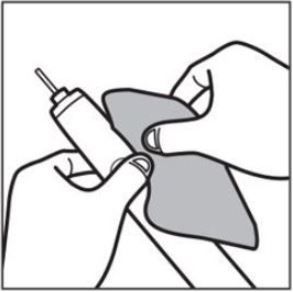
1. Clean the power button.
Toothpaste residue can build up around the power button. The residue is causing the power button to get stuck and not turn on. We recommend cleaning the power button and the surrounding area with a damp cloth.
2. Fully charge the battery.
A toothbrush battery that is not fully charged might need more power to make the toothbrush vibrate. We recommend charging it for at least 24 hours. You can always leave your toothbrush on the charger to avoid this from happening again.
If you have not used your toothbrush for a month or more, your battery may have run out. Place the handle on the charger. The battery is charging, but it might take a few minutes for the battery indicator to light up. We recommend that you charge your toothbrush for at least 24 hours.
If you have not used your toothbrush for a month or more, your battery may have run out. Place the handle on the charger. The battery is charging, but it might take a few minutes for the battery indicator to light up. We recommend that you charge your toothbrush for at least 24 hours.
3. Use a different power source.
Try using a different plug socket to charge your toothbrush fully. A faulty power source connected to your charger may cause your toothbrush not to charge. In some countries, the plug socket in the bathroom has a safety feature that shuts off the power source. Make sure that your plug socket has power before charging your toothbrush.
4. Check the battery light indicator.
If your toothbrush powers on and the battery light indicators are lit, but there is no vibration, your toothbrush has internal damage. We recommend that you request an online repair or exchange.
Are you still having issues with your toothbrush?
If none of these tips help, your toothbrush may be damaged internally. We recommend that you contact us .

