My Philips All-in-One Ironing Solution does not produce steam
Published on 27 February 2023
If your Philips All-in-One Ironing Solution does not produce steam, please find some possible causes and solutions below.
First time use
The first time you use your all-in-one ironing solution, it might not produce steam straight away as there is no water in the system yet. Do not worry. This is normal and will only happen the first time you use it.
Please press the steam trigger for one minute. This will promote water circulation and the production of steam.
Please press the steam trigger for one minute. This will promote water circulation and the production of steam.
Not heated up sufficiently
During start-up: If the power button is flashing, wait for 90 seconds for the all-in-one ironing solution to heat up. You can then press the steam trigger.
During steaming: If the power button is flashing, the all-in-one ironing solution has switched to the auto shut-off mode. Press the power button to get the all-in-one ironing solution to heat up again. Once it has heated up, press the steam trigger.
During steaming: If the power button is flashing, the all-in-one ironing solution has switched to the auto shut-off mode. Press the power button to get the all-in-one ironing solution to heat up again. Once it has heated up, press the steam trigger.
There is no water (or low water level) in the tank
If the tank is empty, your Philips All-in-One Ironing Solution will not be able to produce steam. Please refill the water tank.
The water tank is not inserted properly
If the water tank is not properly inserted, your appliance might not be able to produce steam. Please remove the water tank and insert it again correctly.
Trigger not activated
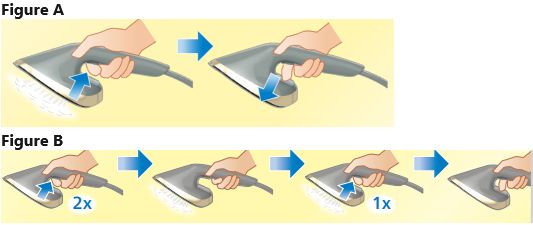
- Hold the steam trigger for steaming (see figure A)
- For continuous steaming:
- During start-up: Activate steam by double-tapping the steam trigger (see figure B)
- During steaming: After 8–10 minutes of usage, the continuous steam will stop automatically. Double-tap the steam trigger to reactivate continuous steaming. If you want to deactivate continuous steam, single-tap the steam trigger (see figure B).
Did the solutions above help solve the issue? If not, please contact us for further assistance.